Compare wheel trackers

The best wheel strategy trackers, YieldCove and 4 alternatives, side by side.

We build YieldCove, so don't take our word for it. Every line about another product below comes from that product's own public pages, with the link and the date we checked. Where we could not confirm something, we say so.

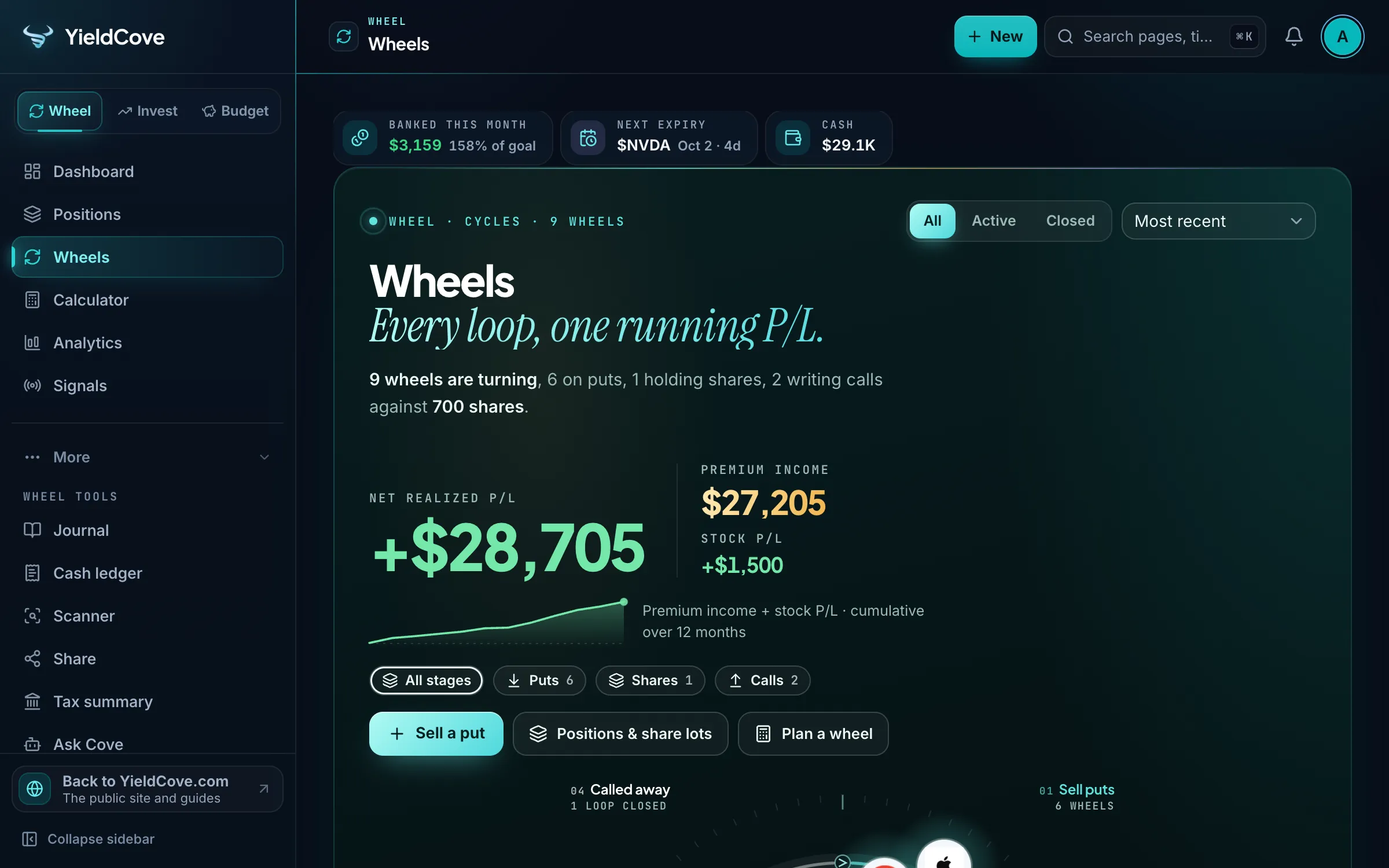
YieldCove Wheels screen on a demo account, showing each ticker's stage and running P/L.

Last checked

November 2, 2026

All four other products, on the same day

Products compared

5

Dedicated wheel trackers

Linked sources

36

Open any of them and check us

Written by

YieldCove

One of the five, so judge accordingly

01

The five, side by side

"Not stated" means we could not find it on the product's own pages. It does not mean the product can't do it.

Swipe sideways to see every product.

Comparison of five wheel strategy trackers by plan, price, broker support, features and languages.
What you getYieldCoveThetaDeskQuantWheelOptionsLoopWheel Folio
Free planThe Wheel workspace is free, with no card required.yieldcove.com/wheel-strategy-trackerFree forever, with no account required.thetadesk.appA free demo with sample positions and delayed data. It can't connect a broker or import real trades. Paid plans start with a 7-day trial for $1.quantwheel.com/how-to/plansFree forever plan with no credit card, including wheel tracking, Robinhood CSV import and P&L charts.optionsloop.appFree for up to 5 open positions and one portfolio, with no card and no expiry. Prices are yesterday's close.wheelfolio.com/pricing
Paid plansOptional PRO at $9.99 a month or $79 a year.yieldcove.com/pricingNone listed. A Pro plan is announced, with no price stated.thetadesk.appThe Wheel plan is $79 a month, $49 a month billed every 3 months, or $35 a month on 12 months.quantwheel.com/pricingPremium at $4.99 a month or $39.99 a year.optionsloop.appPlus at $4.99 a month and Pro at $19.99 a month, or $3.74 and $14.99 a month billed annually.wheelfolio.com/pricing
Automatic broker connectionOptional and read-only, through SnapTrade, on the free plan.yieldcove.com/wheel-strategy-trackerNone today. Live broker sync is announced for its future Pro plan.thetadesk.appOn paid plans. It names E*TRADE, Schwab, tastytrade, Fidelity, Robinhood, Webull, Interactive Brokers, Tradier, Wealthsimple and Alpaca.quantwheel.com/learn/options-position-tracking-toolsNot stated. Its home page says it never asks for brokerage logins.Read-only through SnapTrade, on Pro, with 20 refreshes a month.wheelfolio.com
File importCSV exports from Interactive Brokers, Questrade, Wealthsimple, Schwab, Fidelity, Robinhood, tastytrade and Webull, plus its free spreadsheet.yieldcove.com/tools/import-checkNot stated. Auto-import is announced for Pro. It exports to JSON.Not stated. Its journal fills from the broker connection.quantwheel.com/products/options-journalRobinhood CSV. Trades from any other broker are added by hand.optionsloop.appCSV exports from tastytrade, Schwab, Interactive Brokers, Fidelity and Robinhood, on Plus and up.wheelfolio.com/pricing
Wheel cycle trackingEach ticker shows its stage, adjusted cost basis and one net realized P/L.yieldcove.com/wheel-strategy-trackerCampaigns group each put, assignment, covered call and roll, with an adjusted cost basis.thetadesk.appActive Wheels links every open put, share lot and call in one chain, on the Wheel and Quant plans.quantwheel.com/products/options-wheel-trackerPuts, assignment, covered calls and called-away shares link into one wheel, with cost basis and P&L.optionsloop.appOne record per cycle, with premium carried into the cost basis and rolls kept whole.wheelfolio.com
Beyond the wheelLEAPS count in the P/L and the free calculators are open to all. PRO adds Signals, Research, Pro Tips and the Academy.yieldcove.com/wheel-strategy-trackerPMCC and LEAPS tracking, and free calculators.thetadesk.appScreener, roll finder, journal and GEX tools on Wheel. Options flows and an API on Quant.quantwheel.com/pricingVerticals, iron condors, straddles and calendar spreads. Tax export on Premium.optionsloop.appCandidate screener and calculators. LEAPS, alerts and a tax summary on Pro. Spreads are set aside, not tracked.wheelfolio.com
Where it runs and where data livesA web app, with your data in your YieldCove account.yieldcove.com/privacyIn your browser. Data stays in its local storage, with no server.thetadesk.appAn online platform, plus a Mac and Windows app for its TradingView GEX indicator.quantwheel.com/pricingWeb, iOS and Android. Data is in Google Firestore under your account.optionsloop.appOn the web, with nothing to install. CSV previews run in your browser.wheelfolio.com
French interfaceYes, in full, alongside English.yieldcove.com/Not stated.Not stated.Not stated.Not stated.
Canadian brokers namedQuestrade and Wealthsimple imports, and a Canadian tax summary on PRO.yieldcove.com/tools/import-checkNot stated.Wealthsimple.quantwheel.com/learn/options-position-tracking-toolsNot stated.Not stated.

02

Which one fits you

No overall winner: the right pick depends on how you trade. Each line below comes from the table above.

YieldCove

A good fit if

You want cycle tracking for free, optional read-only broker sync, CSV imports that include Questrade and Wealthsimple, and a choice of English or French.

Keep in mind

It is our own product. Signals, Research and the Academy need PRO.

Visit YieldCove

ThetaDesk

A good fit if

You want no account and no server at all, with PMCC and LEAPS tracked next to your wheels.

Keep in mind

There is no broker connection today, and your data sits in your browser, with a JSON export.

Visit ThetaDesk

QuantWheel

A good fit if

You want the wheel inside a wider paid platform, with a screener, a roll finder and GEX tools.

Keep in mind

The free demo uses sample data, so tracking real trades needs a paid plan.

Visit QuantWheel

OptionsLoop

A good fit if

You want iOS and Android apps and Robinhood import, and you also trade spreads.

Keep in mind

Robinhood CSV is the one import it names. Trades from other brokers go in by hand.

Visit OptionsLoop

Wheel Folio

A good fit if

You want a wheel-only tool that scores candidates and rebuilds cycles from your broker's fills.

Keep in mind

The free plan stops at 5 open positions. Live prices, alerts and the broker connection are on Pro.

Visit Wheel Folio

03

Questions

Straight answers, with the same sources.

What is the best wheel strategy tracker?

No tracker suits everyone. Start with three questions: do you want an automatic broker connection, where should your data live, and what will you pay? YieldCove, ThetaDesk and OptionsLoop can all track the wheel for free, QuantWheel needs a paid plan for real trades, and Wheel Folio is free up to 5 open positions.

Which wheel trackers are free?

ThetaDesk says it is free forever with no account. OptionsLoop has a free forever plan. YieldCove's Wheel workspace is free with no card. Wheel Folio is free up to 5 open positions. QuantWheel's free tier is a demo with sample positions, and its paid plans start with a 7-day trial for $1.

Which wheel trackers connect directly to a broker?

YieldCove connects read-only through SnapTrade on its free plan. Wheel Folio connects read-only through SnapTrade on Pro. QuantWheel connects on its paid plans. ThetaDesk has no broker connection today and announces one for a future Pro plan. OptionsLoop does not state a direct connection.

Which wheel tracker works for Canadian traders or in French?

YieldCove is available in French and English, and imports Questrade and Wealthsimple exports. QuantWheel names Wealthsimple among its broker connections. We found no mention of French or of Canadian brokers on the pages we checked for ThetaDesk, OptionsLoop and Wheel Folio.

Can I trust a comparison written by YieldCove?

Check it. We are one of the five, so we link every claim about another product to that product's own page, show the date we looked and write 'not stated' rather than guess. Prices and features change, so confirm on their site before you decide, and tell us if we got something wrong.

04

How we checked

Own public pages only: no review sites, no rumours and no paid placement.

We read each product's own public pages and quoted only what they state. Nothing here comes from a review site or a reseller.

"Not stated" means we did not find it on those pages. Plans and prices change after our check date, so the product's own site always wins.

YieldCove lines describe features that are live today. Product names belong to their owners, and none of them is affiliated with or has reviewed this page.

Spot something wrong or out of date? Tell us and we will fix it.

See all 36 sources
Each comparison line, the page it came from and the date it was checked.
ProductLinePageChecked
YieldCoveFree planyieldcove.com/wheel-strategy-tracker
YieldCovePaid plansyieldcove.com/pricing
YieldCoveAutomatic broker connectionyieldcove.com/wheel-strategy-tracker
YieldCoveFile importyieldcove.com/tools/import-check
YieldCoveWheel cycle trackingyieldcove.com/wheel-strategy-tracker
YieldCoveBeyond the wheelyieldcove.com/wheel-strategy-tracker
YieldCoveWhere it runs and where data livesyieldcove.com/privacy
YieldCoveFrench interfaceyieldcove.com/
YieldCoveCanadian brokers namedyieldcove.com/tools/import-check
ThetaDeskFree planthetadesk.app
ThetaDeskPaid plansthetadesk.app
ThetaDeskAutomatic broker connectionthetadesk.app
ThetaDeskFile importNot stated on the pages checked
ThetaDeskWheel cycle trackingthetadesk.app
ThetaDeskBeyond the wheelthetadesk.app
ThetaDeskWhere it runs and where data livesthetadesk.app
ThetaDeskFrench interfaceNot stated on the pages checked
ThetaDeskCanadian brokers namedNot stated on the pages checked
QuantWheelFree planquantwheel.com/how-to/plans
QuantWheelPaid plansquantwheel.com/pricing
QuantWheelAutomatic broker connectionquantwheel.com/learn/options-position-tracking-tools
QuantWheelFile importquantwheel.com/products/options-journal
QuantWheelWheel cycle trackingquantwheel.com/products/options-wheel-tracker
QuantWheelBeyond the wheelquantwheel.com/pricing
QuantWheelWhere it runs and where data livesquantwheel.com/pricing
QuantWheelFrench interfaceNot stated on the pages checked
QuantWheelCanadian brokers namedquantwheel.com/learn/options-position-tracking-tools
OptionsLoopFree planoptionsloop.app
OptionsLoopPaid plansoptionsloop.app
OptionsLoopAutomatic broker connectionNot stated on the pages checked
OptionsLoopFile importoptionsloop.app
OptionsLoopWheel cycle trackingoptionsloop.app
OptionsLoopBeyond the wheeloptionsloop.app
OptionsLoopWhere it runs and where data livesoptionsloop.app
OptionsLoopFrench interfaceNot stated on the pages checked
OptionsLoopCanadian brokers namedNot stated on the pages checked
Wheel FolioFree planwheelfolio.com/pricing
Wheel FolioPaid planswheelfolio.com/pricing
Wheel FolioAutomatic broker connectionwheelfolio.com
Wheel FolioFile importwheelfolio.com/pricing
Wheel FolioWheel cycle trackingwheelfolio.com
Wheel FolioBeyond the wheelwheelfolio.com
Wheel FolioWhere it runs and where data liveswheelfolio.com
Wheel FolioFrench interfaceNot stated on the pages checked
Wheel FolioCanadian brokers namedNot stated on the pages checked

05

No sign-up needed for any of these.

Free to start

Try it on your own wheels. No card, no broker connection needed.

Log a position or import a CSV in minutes, then compare it with what you use today.

Comparison for information only, based on public pages on the date shown. YieldCove is for informational and educational purposes only and is not financial advice. Options trading involves substantial risk of loss.